
A Practical Small-Business Network Security Checklist

Every small business depends on a network, even when nobody on the team calls it that. The office router, wireless access points, laptops, phones, printers, cloud applications, security cameras, and remote connections all exchange information. A failure in any one of those parts can interrupt sales, expose customer records, or give an attacker a path to more valuable systems. Network security therefore is not simply an IT project. It is a basic requirement for keeping the business available and trustworthy.
The good news is that a smaller organization does not need an enterprise-sized security department to improve its position. It needs a clear inventory, sensible priorities, reliable routines, and someone who is accountable for each routine. The NIST Cybersecurity Framework offers a useful way to organize this work around governing, identifying, protecting, detecting, responding, and recovering. A business can use those ideas without turning them into a mountain of paperwork.
1. Map the Network Before Trying to Secure It
Begin with a simple inventory. List every router, switch, wireless access point, computer, server, printer, camera, smart television, payment terminal, and other internet-connected device. Record its owner, location, purpose, operating system or firmware version, and whether it stores sensitive information. Include home computers that regularly connect to company accounts and cloud services that hold essential files.
Next, draw a basic diagram showing how those devices connect. The drawing does not have to be beautiful. Its purpose is to reveal dependencies and surprises. Many owners discover an old wireless extender, a former employee’s laptop, or an internet-connected camera that still uses a default password. Understanding how TCP/IP moves information across networks will make the diagram easier to interpret and help nontechnical managers ask better questions.
Give each asset a simple importance rating. A point-of-sale system or customer database deserves more protection than a waiting-room television. Also note what would happen if the device became unavailable for one hour, one day, or one week. This business-impact view prevents the team from spending equal effort on unequal risks.
2. Secure the Router and Wireless Network
The router is the gateway between the business and the public internet. Change its default administrator name and password, install supported firmware updates, disable remote administration unless it is genuinely needed, and turn off features that automatically open inbound connections when the company does not use them. Save the configuration in a secure place so the device can be rebuilt after a failure.
Use modern wireless encryption and a long, unique passphrase. Create a separate guest network for visitors and personal devices. Guests should be able to reach the internet without reaching company computers, printers, or storage. Internet-connected cameras, speakers, and other smart devices should also be separated from sensitive business systems when the equipment allows it. Segmentation limits the damage a compromised device can cause.
If the company has several departments or device groups, divide the network intentionally rather than letting everything share one large address space. The site’s guide to making IP subnetting easier provides a foundation for planning smaller, controlled network segments. Document the purpose of each segment so future technicians do not undo the design simply because they do not recognize it.
3. Strengthen Accounts and Access
Every employee should have an individual account. Shared accounts make it difficult to remove access when someone leaves and almost impossible to determine who made a sensitive change. Administrators should use a normal account for email and routine work, then a separate privileged account only when administrative rights are required.
Require multi-factor authentication for email, cloud storage, financial applications, remote access, and administrator accounts. A stolen password should not be enough to enter the business. Prefer authenticator applications, security keys, or passkeys when available. Text messages are still better than a password alone, but stronger methods resist more kinds of interception and social engineering.
Apply least privilege: people receive the access needed for their current work, not every permission they might someday use. Review access at least quarterly and immediately after role changes. Build a same-day offboarding checklist that disables accounts, collects devices, transfers ownership of files, changes shared credentials, and removes remote access.
4. Patch Systems and Replace Unsupported Equipment
Attackers regularly exploit known weaknesses for which fixes already exist. Turn on automatic security updates for operating systems, browsers, productivity tools, phones, and supported network equipment. For business-critical applications, test major updates before broad deployment, but do not use testing as a reason for indefinite delay.
Maintain a short monthly report showing devices that failed to update, software that is approaching end of support, and systems that cannot be patched. Unsupported equipment creates permanent risk because new flaws may never be corrected. Budget for replacement before support ends. This turns emergency purchasing into planned maintenance.
Third-party software deserves attention too. Browser extensions, remote-support utilities, PDF tools, and abandoned plug-ins can become entry points. Remove software employees do not need. Standardizing on a smaller set of approved applications also reduces support time and makes patching easier to verify.
5. Protect Endpoints and Email
Use reputable endpoint protection on company computers, but do not treat antivirus software as a complete defense. Configure screen locking, full-disk encryption, automatic updates, and device-management controls. Employees should not store the only copy of a business file on a laptop. If a device is lost or damaged, the company must be able to protect its data and restore the user’s work.
Email remains a common route for credential theft and malware. Train employees to pause when a message creates urgency, requests a payment change, asks for credentials, or provides an unexpected attachment. Establish a second-channel verification procedure for bank-detail changes, gift-card requests, payroll changes, and sensitive data transfers. The employee should call a known number or use a previously established channel, not the contact information contained in the suspicious message.
Security awareness works best as a brief, recurring practice. A ten-minute monthly discussion about one realistic scenario is usually more memorable than an annual presentation filled with abstract warnings. Make reporting easy and reward quick reporting, even when the employee clicked first. Fast disclosure can prevent a small mistake from becoming a major incident.
6. Back Up Data and Test Recovery
Identify information the business cannot recreate: accounting records, contracts, customer files, designs, product data, and operational documentation. Back it up automatically to a location that is not continuously writable from the same user account or network. Keep at least one protected or offline copy so ransomware cannot encrypt every version at once.
A successful backup notification does not prove the data can be restored. Test a sample recovery every quarter. Once or twice a year, perform a broader exercise: assume a server or cloud account is unavailable and rebuild the most important process from documented backups. Record the recovery time and any missing credentials, instructions, or dependencies.
7. Monitor for Warning Signs
Small organizations do not need to watch every packet, but they should preserve useful logs and review meaningful alerts. Important signals include repeated failed logins, sign-ins from unusual locations, new administrator accounts, disabled security tools, unexpected forwarding rules in email, large data transfers, and changes to backup settings.
Decide who receives alerts and what that person should do. An alert sent to an unmonitored mailbox is not a control. If IT is outsourced, clarify which events the provider investigates, how quickly it responds, and who contacts business leadership. Keep emergency contact details somewhere accessible even when the network is down.
8. Prepare a Short Incident Plan
Write a one- or two-page response plan. It should identify who can disconnect systems, who communicates with customers and employees, who contacts the insurer or legal adviser, and where clean backups and vendor contacts are stored. Include a decision log so the team can record what happened, when it happened, and why each action was taken.
Run a tabletop exercise using a believable scenario, such as a compromised email account or an encrypted shared drive. Ask what the team would notice first, whom they would call, which system they would isolate, and how normal operations would continue. The exercise will expose unclear authority and missing information without the pressure of a real emergency.
Make Security a Managed Business Routine
Network security improves through consistent ownership, not through a single shopping trip. Assign a responsible person, set a monthly review, track a small number of actions, and report unresolved risks to leadership in plain business terms. Start with the systems that create revenue, hold sensitive data, or support essential operations. When the basics are reliable, the organization can add more advanced controls with confidence.
The most useful checklist is the one the team actually maintains. Inventory the environment, separate risky devices, strengthen identity, patch promptly, back up essential data, watch for meaningful warnings, and practice recovery. Those habits reduce both the likelihood of an incident and the disruption when something eventually goes wrong.…
How to Make Your Website More Engaging

Today the attention span of the user is becoming shorter and shorter, so for a business, it is pretty much important they maintain the interest of their users in order to increase their productivity.
Company Website Design is a very renowned website designing firm and they share a forte of presenting some very engaging and productive website designs. For more details, you can visit their website companywebsitedesign.com.au.
So for that, it is important that you create a website which is way more engaging and glues the visitors to it. So here’s how you can make your website engaging.
Stick With A Modern Website Design
Today for increasing traffic on your website it is pretty much important your professional website is both visually appealing and modern.
A modern website design can be defined as the website should be properly organized and consisting of all the information about the company and its products.
For designing a modern style website it is advisable that you take help of a professional who is specialized in building company websites.
Use Images Sensibly
Images are the easiest way to attract visitors, but at times it can also be an easy way to abuse by misusing the images.
So you should be extra careful while using images and make sure that it does not overwhelm the visitors.
If you images are not able to communicate properly about your brands, then they will serve no purpose and will probably detract users from your website.
Make Good Use Of Color
If the logo of your company features colors other than black and white, then there’s no logic is using a color scheme that is different from the colors which are associated with your company.
So it is advisable that you make a wise sue of the logo colors as the visitors will associate with your company with respect to them.
For creating an engaging website all you need to bring in is some efforts and willingness of paying attention to the latest website design trends.
…
IP Subnetting Just Made Easy
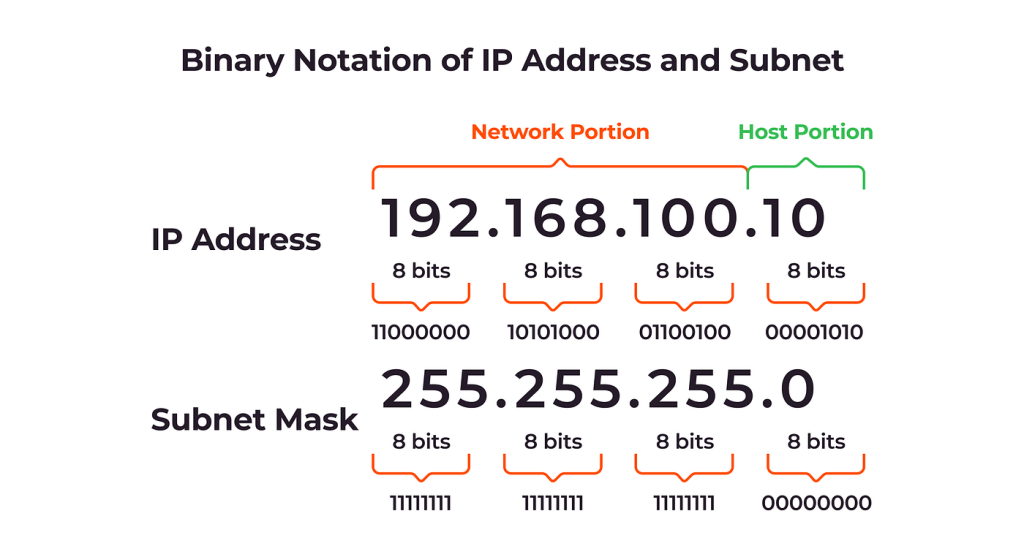
IP subnetting is considered to be a very critical and core part of any IP networking. Over these years, it has been found that a lot of people struggle a lot to understand and study as it’s never explained in a way that people can understand. Due to which the struggle a lot while dealing with IP subnetting in the field. Here we bring in for you A to Z aspects of IP subnetting explained in an easy way that anyone can understand it.
IP address and subnets
IP address or Internet Protocol is a communication protocol, which is used from the smallest private network of the huge global networks such as the internet. In short IP address is a unique identification address that is given to a device on an IP network. An IP address consists of a 32-bit number ranging from 0 to 4294967295. All these large blocks are divided into small blocks or octets in order to make it easier to handle.
A subnet is the smallest network within large networks which directly correlate with a LAN. These play a vital role in establishing a network of communication through which a network can directly communicate with other MAC addresses. Subnets are divided into two parts, the beginning part is the Network ID and the ending part is the Broadcast ID. A data is transferred through a Broadcast ID which sends it to the right address. Network ID helps to establish a connection between the networks
The subnet mask plays a very vital role in determining the size of any subnet. 255,254,252,248,240,224,192, and 128 are the special numbers which you will see over and over again in the IP networking. The first two classes with a host bit length from 0 to 16. Mostly private networks work in the 8- to 24- bit range.
The “mask” In Subnet Mask
The mask in the subnet just not determines the size of a subnet, but it also helps to point out the end points of a subnet if any IP address is given within that subnet. A subnet mask literally masks out the host bits and leaves only the Network ID. So that you can easily determine the end and the beginning of the subnet.…
How Does A TCP/IP Fire Up The Internet?
TCP/IP is a communication language of the internet which allows communication between two or more computers through various network packets. Now these packets are a compilation of small data packs which are transmitted to other users via the internet.
TCP plays a vital role in collecting a large amount of data, then compiling it into various packets and then sending it to the receiver. Where the packet transforms into a useful information.
IP protocol layer helps that packet of information to be sent and received at the location needed to be transferred. This task is basically carried out on the surface, but there’s also a whole lot of going on under the surface which helps to work out things on the surface.
Under the surface internet consists of fours abstract layers which are:
1. Link Layer which is a physical layer which interconnects the nodes and servers.
2. Internet Layer which connects the host to various other across networks.
3. Transport Layer performs all the host-host connections.
4. Application Layer ensures the communication between applications on a network.
In short all these four layers are embedded in the TC/IP to ensure that all the data packets are sent and received at the correct location.
The internet is all about communication and access to information, but as we all know that the internet is like a spider’s web which consists of a lot of connection points. So it’s very important that a right amount of information is accessed whether it’s requested from any location. For this TCP/IP is very much required as it plays a vital role in accessing the information right to your computers, no matter from where you access it.
Now to work out the internet properly it’s pretty much important that information accessed reaches where is should reach. As we all know that there are many peers and points in the internet network so the information needs to take a lot of hops to reach to its destination.
Here TCP/IP is needed to make sure that the information reaches its ideal destination and no where else. So we can say that without TC/IP one cannot transfer packets of information to their desired location and make the internet workout as it is working today.…
