
How to Review an Online Service Before Sharing Your Personal Information
An unfamiliar website can look convincing within seconds. Clear photographs, confident promises, and a professional booking form create an impression of reliability. Yet appearance alone tells you little about who receives your information or what happens after you submit it.
Whether you are comparing a software subscription, arranging travel, or researching a personal service, a better approach is to separate three questions: Have you reached the intended website? Is the connection protected? Does the business deserve the information it requests?
Each question needs its own check.
Start with the address, not the advertisement
Before entering personal details, inspect the website address. Read the actual domain rather than relying on a familiar logo or the wording of a search advertisement.
For example, a company name appearing somewhere in a long address does not necessarily mean that company controls the website. When a booking or payment link arrives unexpectedly, return to a previously verified address rather than following the message automatically.
The Federal Trade Commission’s guide to recognizing phishing scams recommends contacting an organization through a website or telephone number you already know is genuine when a message looks suspicious. An urgent request to update payment information deserves particular care.
A useful habit is to establish the correct address before the situation becomes urgent. Save verified account pages and support details when you first register.
Understand what an encrypted connection proves
HTTPS protects information while it travels between your browser and the website. That protection matters, especially when submitting passwords or personal details.
However, encryption does not establish that the business itself is honest. The FTC explains that fraudulent websites can also use encryption: information may reach the site securely and still end up with a scammer. Its public Wi-Fi and online-security guidance makes this distinction clear.
Treat connection security and business credibility as separate checks. A working HTTPS connection answers a technical question. It does not answer questions about refunds, service quality, or the handling of customer records.
If the browser displays a certificate warning, stop before entering sensitive information and investigate through another verified contact method.
Look beyond reputation claims
A business can describe itself as established, trusted, discreet, or customer-focused. Those descriptions are claims to assess rather than independent evidence.
This distinction matters particularly for sensitive personal services. Someone researching London escorts and private companionship should apply the same questions about identity, data collection, and payment terms that they would apply to other online businesses. An agency’s own profile can explain how it presents its services, but independent verification requires additional evidence.
Look for information that can be checked:
- A consistent business identity across its contact and policy pages.
- Clear explanations of charges and cancellation conditions.
- A realistic way to ask questions before paying.
- Privacy information that describes actual practices.
- Reviews detailed enough to evaluate beyond a star rating.
No single item guarantees reliability. Together, they provide a more useful basis for judgment than promotional language alone.
Ask why each piece of information is needed
Before completing a form, consider the purpose of every requested detail.
A delivery service may need an address. An appointment provider may need a contact method. A newsletter usually has less reason to request identification documents or extensive personal history.
Where a request seems excessive, ask whether a less sensitive alternative is available. Leave optional fields blank when they do not serve your purpose.
Pay particular attention to document uploads. Before supplying identification, establish who receives it, why it is necessary, how it will be transmitted, and what the provider says about retention. A vague reassurance about “security” does not answer those questions.
Know where DNS fits
Website access also depends on the network services operating behind the browser. DNS helps devices find the network addresses associated with domain names.
For the underlying process, see how DNS works and why businesses should monitor it.
Cloudflare’s documentation on encrypted DNS explains how DNS over HTTPS and DNS over TLS protect DNS traffic between a device and its resolver. These technologies protect a particular part of the connection; they do not establish whether a business’s advertising is accurate.
For office users, browser settings should also fit the organization’s network policy. Ask the administrator before changing DNS settings on a managed device.
Keep personal research separate from office systems
If you manage a small business, make clear decisions about which devices and networks employees should use for personal activity.
Network organization starts with understanding what is connected. An IPv4 subnetting plan for a growing office provides a relevant starting point for addressing and capacity decisions.
Do not assume that different address ranges automatically provide security. Ask whoever manages the network to explain which access restrictions are actually enforced.
For individual users, avoid saving private account credentials on shared computers. Check which browser profile is active before storing passwords, addresses, or payment details.
Make the final decision before submitting
Pause at the point where browsing becomes disclosure. Can you identify the recipient? Do you understand the charge? Is the information requested proportionate? Could you contact the business if something goes wrong?
If an important answer is missing, close the form and investigate first. A legitimate decision should survive a few extra minutes of checking.
The strongest online habit is deliberate disclosure: sharing information only after you understand who needs it and why.…
How DNS Works and Why Businesses Should Monitor It

People remember names such as example.com; computers exchange traffic using IP addresses. The Domain Name System, or DNS, connects those two worlds. It helps a browser find a website, guides email toward the correct mail server, verifies some security policies, and supports many cloud services. Because DNS usually works quietly, businesses often notice it only when a website disappears, email fails, or visitors are redirected somewhere dangerous.
DNS is both an internet foundation and a business asset. A company’s domain name is part of its identity, while the records attached to that domain control important technical behavior. The Internet Corporation for Assigned Names and Numbers explains the DNS as a distributed system that helps users reach internet resources without memorizing numerical addresses. Understanding its path makes outages and security decisions far easier to manage.
From a Typed Name to an IP Address
When a user enters a website address, the browser and operating system first check whether they recently resolved the name. If no valid cached answer exists, the device asks a recursive resolver, often operated by the internet provider, company, or public DNS service. The resolver performs the lookup on the user’s behalf and stores the result temporarily.
For a name it does not know, the resolver can begin at a root server. The root does not normally return the final website address. It points the resolver toward the name servers responsible for the appropriate top-level domain, such as .com. The top-level-domain server then points toward the domain’s authoritative name servers. Those authoritative servers provide the requested record, such as the address for www.example.com.
The resolver returns that answer to the user’s device, where it may be cached according to the record’s time to live. The browser can then use the address to begin a connection. The site’s overview of how TCP/IP powers internet communication explains what happens after name resolution: transport and internet protocols carry the request and response between systems.
The Records a Business Is Most Likely to Use
An A record maps a name to an IPv4 address, while an AAAA record maps it to an IPv6 address. A CNAME record makes one name an alias of another, which can simplify the use of hosted services. MX records identify mail servers that accept email for the domain. TXT records store text used for ownership verification and email authentication policies. NS records declare the authoritative name servers for a zone.
Service providers may ask a company to create specific records when connecting a website, email platform, support portal, or marketing tool. Treat those requests as configuration changes, not harmless copy-and-paste tasks. The record may redirect traffic or grant a provider the ability to act for the domain. Confirm the request through an approved channel, record its owner and purpose, and remove it when the service ends.
DNS records also have dependencies. A website alias may point to a provider-controlled name that later changes. An email authentication record may refer to a third-party sender. Documenting the full chain helps the business understand which vendor outage or account closure could affect its public services.
Why Time to Live Matters
The time-to-live value tells resolvers how long they may cache an answer. A longer TTL reduces repeated lookup traffic and can improve resilience during a brief authoritative DNS problem, because resolvers may continue using the cached value. A shorter TTL allows planned changes to spread more quickly, but it creates more frequent queries and does not guarantee every cache will update instantly.
Before moving a website or mail service, administrators often lower the relevant TTL well in advance. After the old value has had time to expire, the new address can be introduced with a shorter caching window. Once the migration is stable, the TTL can be raised again. Changing the TTL at the same moment as the destination is too late for resolvers that already cached the previous long value.
DNS propagation is not a single global event with a universal completion clock. Different resolvers cache records at different times. During a change, users may temporarily receive different valid answers. A migration plan should therefore keep the old service available long enough to handle residual traffic.
For the customer-facing side of website security, learn how to assess an online service beyond its connection security before entering personal details.
Domain Registration Is a Security Control
If an attacker gains control of the registrar account, the attacker may be able to change name servers or contact information and redirect the entire domain. Protect the registrar with a unique password, multi-factor authentication, tightly limited administrators, and a recovery email that is itself well secured. Enable registrar lock or transfer lock, and consider stronger registry-lock services for especially valuable domains.
Keep registration contact details accurate and renew domains well before expiration. Use automatic renewal with a current payment method, but do not rely on automation alone. Assign a named owner to review renewal status and registrar notices. Domain expiration can disrupt the website and email, and opportunistic buyers may acquire an unrenewed name.
Do not let a web developer or temporary vendor register the company’s primary domain in a personal account. The legal business should control the registrar relationship, billing, recovery methods, and administrative access. Vendors can receive delegated technical access without owning the asset.
Protect the Integrity of DNS Answers
DNS Security Extensions, or DNSSEC, allow resolvers to validate that certain DNS data was signed by the responsible zone and was not altered in transit. DNSSEC does not encrypt queries and does not prove a website itself is trustworthy. It protects the authenticity and integrity of the DNS response chain when correctly deployed.
Enabling DNSSEC requires coordination between the DNS provider and registrar. A mismatch can make a domain unreachable for validating users. Document the keys or delegation records involved, understand the provider’s rollover procedure, and test before major changes. Organizations should not enable it casually and then forget who manages the signing process.
Encrypted DNS transports, such as DNS over HTTPS and DNS over TLS, address a different problem by protecting queries between a client and resolver from some forms of observation or alteration. Businesses should choose resolver policies deliberately. Unmanaged encrypted DNS applications can bypass company filtering and monitoring, while a properly managed encrypted resolver can improve privacy and integrity.
Monitor Availability and Unauthorized Changes
Monitor the public website and DNS records from outside the company’s own network. Internal testing may succeed because of a cache even while authoritative servers are failing. External monitoring should verify resolution from several locations and alert on unexpected address, name-server, mail, or certificate-related changes.
Keep an approved baseline of important records. Alert when NS, MX, A, AAAA, CNAME, and sensitive TXT records differ from that baseline. Some changes will be legitimate, but rapid detection limits the time an unauthorized redirect or mail configuration remains active. Retain a change log that shows who requested the change, who approved it, when it was made, and when it should be reviewed or removed.
Monitor certificate transparency logs and web certificates as additional signals. A new certificate issued for a company domain may indicate a new service, a forgotten subdomain, or suspicious activity. It is not proof of compromise, but it deserves investigation when nobody recognizes the issuance.
Troubleshoot Methodically
When a service fails, separate name resolution from application connectivity. First confirm which resolver the device uses. Query the requested record and note the returned value and TTL. Compare it with the authoritative answer. Then test the application directly, where safe, to determine whether DNS is wrong or the destination service is unavailable.
Check whether the problem affects one device, one office, one internet provider, or users everywhere. A local cache, filtering policy, VPN, or home-router issue can create a narrow failure. An authoritative configuration mistake produces a wider pattern. Avoid changing several DNS records at once during troubleshooting; uncontrolled changes make evidence disappear and can create additional failures.
Maintain a recovery sheet containing the registrar, DNS host, account owners, emergency support routes, approved name servers, and last known good records. Store it somewhere the team can reach even if company email or single sign-on is down.
Make DNS Part of Change Management
DNS should be reviewed whenever the business launches a new website, changes an email provider, adopts a cloud application, leaves a vendor, or rebrands. Old records can expose abandoned subdomains or continue authorizing services that no longer work for the company. A quarterly review is a reasonable starting point for a small organization.
The system may be invisible during normal work, but it directs customers, messages, and applications every day. Businesses that protect registrar access, document records, manage TTL values, monitor changes, and rehearse recovery turn DNS from a hidden dependency into a controlled and resilient service.…
IPv4 Subnetting for a Growing Office: A Planning Guide

A small office often begins with one router and one wireless network. Every laptop, phone, printer, camera, and guest device receives an address from the same pool, and the arrangement seems convenient. As the company grows, however, that flat network becomes harder to manage. Broadcast traffic increases, address assignments become confusing, and devices with very different security needs can communicate too freely. Subnetting provides a structured way to divide the network into smaller logical areas.
Subnetting is not merely arithmetic. It is a planning tool that helps a business reserve capacity, separate functions, control access, and troubleshoot problems. The site’s introduction to IP subnetting made easy explains the core calculation. This guide takes the next step: turning those calculations into a practical design for a growing office.
Understand the Building Blocks
An IPv4 address contains 32 binary digits, commonly displayed as four decimal numbers such as 192.168.10.25. A subnet mask or CIDR prefix identifies which part represents the network and which part represents a host within that network. In 192.168.10.0/24, the first 24 bits describe the network, leaving eight bits for host addressing.
A /24 contains 256 total addresses. In a traditional subnet, the first address identifies the network and the last is the broadcast address, so 254 addresses are normally usable by hosts. A /25 divides that space into two blocks of 128 total addresses. A /26 creates four blocks of 64. Each additional prefix bit doubles the number of subnets and halves the size of each subnet.
Private IPv4 ranges are intended for internal use and are not routed across the public internet. They include 10.0.0.0/8, 172.16.0.0/12, and 192.168.0.0/16. Their formal definition appears in RFC 1918 from the Internet Engineering Task Force. Choosing from those ranges prevents conflict with public addresses, but planners must still avoid overlap with home networks, branch offices, cloud networks, and business partners connected through virtual private networks.
Start With Business Functions, Not Address Math
Before selecting prefixes, list the groups that should be separated. A typical office might need networks for employee computers, voice phones, servers, printers, security cameras, building systems, guests, and network management. Separation should reflect risk and operations. A guest phone should not be able to open a printer interface. A camera should not have unrestricted access to accounting files. A network administrator may need to manage switches without exposing those interfaces to every employee device.
Alongside planning your office network, establish a staff routine for reviewing external services before sharing sensitive information.
For each group, count current devices and estimate a realistic three-year maximum. Include addresses used by gateways, access points, virtual machines, test devices, and equipment that may be offline during the count. Then add a growth margin. A design that exactly fits today’s inventory creates unnecessary renumbering after the next hiring round or equipment upgrade.
Do not make every subnet the same size simply for visual neatness. A guest wireless network may need hundreds of temporary addresses while a management network needs fewer than twenty. Variable Length Subnet Masking allows different prefix lengths within the same larger address block, preserving space while keeping the plan understandable.
A Worked Office Example
Suppose a company receives 10.40.0.0/22 for its main office. That block covers 1,024 total addresses, from 10.40.0.0 through 10.40.3.255. The company estimates the following needs: 220 employee and mobile devices, 100 guest devices, 60 phones, 45 cameras and building devices, 30 servers, 25 printers, and 20 management interfaces.
Allocate the largest groups first. Employee devices could use 10.40.0.0/24, providing 254 usable addresses. Guests could receive 10.40.1.0/25, with 126 usable addresses. Phones could use 10.40.1.128/25. Cameras and building systems could take 10.40.2.0/26, while servers use 10.40.2.64/26. Printers could use 10.40.2.128/27, and network management could use 10.40.2.160/27. The remainder stays reserved for growth, another floor, a lab, or a future service.
For every subnet, record the CIDR prefix, subnet mask, network address, usable range, broadcast address, default gateway, DHCP range, static range, DNS settings, VLAN identifier, and purpose. This documentation is more valuable than a diagram alone because it tells a technician exactly how addressing should work.
Coordinate VLANs, Routing, and Firewall Rules
A subnet is an IP concept; a VLAN is a Layer 2 segmentation concept. They are often paired so that one VLAN corresponds to one IP subnet. Managed switches tag traffic with a VLAN identifier, while a router or Layer 3 switch moves authorized traffic between subnets. Simply assigning different IP ranges without configuring switching and routing does not create dependable isolation.
Inter-subnet traffic should follow explicit rules. Begin with deny-by-default between sensitive groups, then allow necessary communication. Employee devices may need to reach application servers and printers. Phones may need to reach call-control services, DNS, network time, and the internet. Cameras may need to communicate only with a recording server and management station. Guest devices generally need internet access but no path to internal networks.
The rules should describe business flows rather than broad technical convenience. “Employee VLAN may reach server VLAN” is often too permissive. A better rule identifies the source group, destination service, protocol, port, owner, and reason. Understanding how TCP/IP establishes and carries connections helps administrators create narrow rules that support the application without opening unrelated services.
Plan DHCP and Static Assignments
Dynamic Host Configuration Protocol automatically provides addresses and other network settings. Create a separate DHCP scope for each client subnet. Exclude the gateway and any addresses reserved for infrastructure. Set lease durations according to use: a busy guest network may benefit from shorter leases, while stable employee networks can use longer ones.
Use reservations when a device should keep a predictable address but still be centrally managed. Printers, phones, and some appliances are easier to replace when the address is tied to the device identity in DHCP rather than typed manually into the device. Use true static assignments for core infrastructure only when operational requirements justify them, and record every static address in the source of truth.
Configure redundant or highly available DNS and DHCP services where downtime would halt operations. Protect DHCP servers from unauthorized changes, because a rogue or misconfigured service can send devices to the wrong gateway or name server even when every address calculation is correct.
Avoid Common Design Mistakes
Overlapping networks are a frequent source of VPN and cloud connectivity failures. If the office uses 192.168.1.0/24, many employees’ home routers may use the same range. A remote device then cannot easily determine whether a destination is at home or across the VPN. Using a thoughtfully selected portion of 10.0.0.0/8 or 172.16.0.0/12 can reduce common collisions, although coordination remains necessary.
Another mistake is creating subnets so small that normal growth exhausts them. Moving from a /28 to a larger block later may require address changes, downtime, and firewall updates. Conversely, using a /16 for one office leaves far more broadcast and administrative scope than it needs. Design for reasonable growth, not infinite growth.
Do not rely on VLAN names as security. A network named “Secure-Servers” is secure only if switching, routing, authentication, firewall policy, monitoring, and system configuration support that claim. Also protect the management plane: switch and firewall interfaces should be reachable only from authorized administration devices through encrypted protocols.
Test Before Migration
Build the design in a lab, simulation, or limited pilot. Verify address allocation, name resolution, internet access, printing, voice calls, application connections, and monitoring. Test both allowed and denied traffic. A successful connection proves an allow rule works; a failed unauthorized connection proves isolation works.
During migration, move one device group at a time and maintain a rollback plan. Lower DNS time-to-live values in advance when name changes are involved. Announce expected interruptions and arrange support coverage. After the move, compare connected-device counts with the inventory so nothing silently remains on the old network.
Keep the Address Plan Alive
An address plan becomes inaccurate unless changes are part of normal operations. Require technicians to update it when they add a VLAN, change a DHCP scope, reserve an address, or connect a new site. Review utilization and firewall rules quarterly. Remove obsolete rules and reclaim abandoned reservations only after confirming they are unused.
Well-planned subnetting makes growth less chaotic. It gives each device group enough room, establishes clear boundaries, and creates a language for troubleshooting. The calculation matters, but the lasting value comes from linking addresses to business purpose, access policy, documentation, and disciplined change management.…
A Practical Small-Business Network Security Checklist

Every small business depends on a network, even when nobody on the team calls it that. The office router, wireless access points, laptops, phones, printers, cloud applications, security cameras, and remote connections all exchange information. A failure in any one of those parts can interrupt sales, expose customer records, or give an attacker a path to more valuable systems. Network security therefore is not simply an IT project. It is a basic requirement for keeping the business available and trustworthy.
The good news is that a smaller organization does not need an enterprise-sized security department to improve its position. It needs a clear inventory, sensible priorities, reliable routines, and someone who is accountable for each routine. The NIST Cybersecurity Framework offers a useful way to organize this work around governing, identifying, protecting, detecting, responding, and recovering. A business can use those ideas without turning them into a mountain of paperwork.
1. Map the Network Before Trying to Secure It
Begin with a simple inventory. List every router, switch, wireless access point, computer, server, printer, camera, smart television, payment terminal, and other internet-connected device. Record its owner, location, purpose, operating system or firmware version, and whether it stores sensitive information. Include home computers that regularly connect to company accounts and cloud services that hold essential files.
Next, draw a basic diagram showing how those devices connect. The drawing does not have to be beautiful. Its purpose is to reveal dependencies and surprises. Many owners discover an old wireless extender, a former employee’s laptop, or an internet-connected camera that still uses a default password. Understanding how TCP/IP moves information across networks will make the diagram easier to interpret and help nontechnical managers ask better questions.
Give each asset a simple importance rating. A point-of-sale system or customer database deserves more protection than a waiting-room television. Also note what would happen if the device became unavailable for one hour, one day, or one week. This business-impact view prevents the team from spending equal effort on unequal risks.
2. Secure the Router and Wireless Network
The router is the gateway between the business and the public internet. Change its default administrator name and password, install supported firmware updates, disable remote administration unless it is genuinely needed, and turn off features that automatically open inbound connections when the company does not use them. Save the configuration in a secure place so the device can be rebuilt after a failure.
Use modern wireless encryption and a long, unique passphrase. Create a separate guest network for visitors and personal devices. Guests should be able to reach the internet without reaching company computers, printers, or storage. Internet-connected cameras, speakers, and other smart devices should also be separated from sensitive business systems when the equipment allows it. Segmentation limits the damage a compromised device can cause.
If the company has several departments or device groups, divide the network intentionally rather than letting everything share one large address space. The site’s guide to making IP subnetting easier provides a foundation for planning smaller, controlled network segments. Document the purpose of each segment so future technicians do not undo the design simply because they do not recognize it.
3. Strengthen Accounts and Access
Every employee should have an individual account. Shared accounts make it difficult to remove access when someone leaves and almost impossible to determine who made a sensitive change. Administrators should use a normal account for email and routine work, then a separate privileged account only when administrative rights are required.
Require multi-factor authentication for email, cloud storage, financial applications, remote access, and administrator accounts. A stolen password should not be enough to enter the business. Prefer authenticator applications, security keys, or passkeys when available. Text messages are still better than a password alone, but stronger methods resist more kinds of interception and social engineering.
Apply least privilege: people receive the access needed for their current work, not every permission they might someday use. Review access at least quarterly and immediately after role changes. Build a same-day offboarding checklist that disables accounts, collects devices, transfers ownership of files, changes shared credentials, and removes remote access.
4. Patch Systems and Replace Unsupported Equipment
Attackers regularly exploit known weaknesses for which fixes already exist. Turn on automatic security updates for operating systems, browsers, productivity tools, phones, and supported network equipment. For business-critical applications, test major updates before broad deployment, but do not use testing as a reason for indefinite delay.
Maintain a short monthly report showing devices that failed to update, software that is approaching end of support, and systems that cannot be patched. Unsupported equipment creates permanent risk because new flaws may never be corrected. Budget for replacement before support ends. This turns emergency purchasing into planned maintenance.
Add a privacy and credibility check for unfamiliar online services to the steps employees follow before submitting business or customer details.
Third-party software deserves attention too. Browser extensions, remote-support utilities, PDF tools, and abandoned plug-ins can become entry points. Remove software employees do not need. Standardizing on a smaller set of approved applications also reduces support time and makes patching easier to verify.
5. Protect Endpoints and Email
Use reputable endpoint protection on company computers, but do not treat antivirus software as a complete defense. Configure screen locking, full-disk encryption, automatic updates, and device-management controls. Employees should not store the only copy of a business file on a laptop. If a device is lost or damaged, the company must be able to protect its data and restore the user’s work.
Email remains a common route for credential theft and malware. Train employees to pause when a message creates urgency, requests a payment change, asks for credentials, or provides an unexpected attachment. Establish a second-channel verification procedure for bank-detail changes, gift-card requests, payroll changes, and sensitive data transfers. The employee should call a known number or use a previously established channel, not the contact information contained in the suspicious message.
Security awareness works best as a brief, recurring practice. A ten-minute monthly discussion about one realistic scenario is usually more memorable than an annual presentation filled with abstract warnings. Make reporting easy and reward quick reporting, even when the employee clicked first. Fast disclosure can prevent a small mistake from becoming a major incident.
6. Back Up Data and Test Recovery
Identify information the business cannot recreate: accounting records, contracts, customer files, designs, product data, and operational documentation. Back it up automatically to a location that is not continuously writable from the same user account or network. Keep at least one protected or offline copy so ransomware cannot encrypt every version at once.
A successful backup notification does not prove the data can be restored. Test a sample recovery every quarter. Once or twice a year, perform a broader exercise: assume a server or cloud account is unavailable and rebuild the most important process from documented backups. Record the recovery time and any missing credentials, instructions, or dependencies.
7. Monitor for Warning Signs
Small organizations do not need to watch every packet, but they should preserve useful logs and review meaningful alerts. Important signals include repeated failed logins, sign-ins from unusual locations, new administrator accounts, disabled security tools, unexpected forwarding rules in email, large data transfers, and changes to backup settings.
Decide who receives alerts and what that person should do. An alert sent to an unmonitored mailbox is not a control. If IT is outsourced, clarify which events the provider investigates, how quickly it responds, and who contacts business leadership. Keep emergency contact details somewhere accessible even when the network is down.
8. Prepare a Short Incident Plan
Write a one- or two-page response plan. It should identify who can disconnect systems, who communicates with customers and employees, who contacts the insurer or legal adviser, and where clean backups and vendor contacts are stored. Include a decision log so the team can record what happened, when it happened, and why each action was taken.
Run a tabletop exercise using a believable scenario, such as a compromised email account or an encrypted shared drive. Ask what the team would notice first, whom they would call, which system they would isolate, and how normal operations would continue. The exercise will expose unclear authority and missing information without the pressure of a real emergency.
Make Security a Managed Business Routine
Network security improves through consistent ownership, not through a single shopping trip. Assign a responsible person, set a monthly review, track a small number of actions, and report unresolved risks to leadership in plain business terms. Start with the systems that create revenue, hold sensitive data, or support essential operations. When the basics are reliable, the organization can add more advanced controls with confidence.
The most useful checklist is the one the team actually maintains. Inventory the environment, separate risky devices, strengthen identity, patch promptly, back up essential data, watch for meaningful warnings, and practice recovery. Those habits reduce both the likelihood of an incident and the disruption when something eventually goes wrong.…
How to Make Your Website More Engaging

Today the attention span of the user is becoming shorter and shorter, so for a business, it is pretty much important they maintain the interest of their users in order to increase their productivity.
Company Website Design is a very renowned website designing firm and they share a forte of presenting some very engaging and productive website designs. For more details, you can visit their website companywebsitedesign.com.au.
So for that, it is important that you create a website which is way more engaging and glues the visitors to it. So here’s how you can make your website engaging.
Stick With A Modern Website Design
Today for increasing traffic on your website it is pretty much important your professional website is both visually appealing and modern.
A modern website design can be defined as the website should be properly organized and consisting of all the information about the company and its products.
For designing a modern style website it is advisable that you take help of a professional who is specialized in building company websites.
Use Images Sensibly
Images are the easiest way to attract visitors, but at times it can also be an easy way to abuse by misusing the images.
So you should be extra careful while using images and make sure that it does not overwhelm the visitors.
Make your website easier to trust by understanding what visitors should check before sharing personal information online.
If you images are not able to communicate properly about your brands, then they will serve no purpose and will probably detract users from your website.
Make Good Use Of Color
If the logo of your company features colors other than black and white, then there’s no logic is using a color scheme that is different from the colors which are associated with your company.
So it is advisable that you make a wise sue of the logo colors as the visitors will associate with your company with respect to them.
For creating an engaging website all you need to bring in is some efforts and willingness of paying attention to the latest website design trends.
…
How To Choose A Private Jet Charter Company?

When you think of flying in a private jet, traveling in luxury is the only thing that tangles into your mind. Free Champagne, Comfortable Beds, Spacious cabin and lot more beautiful images are crafted quickly. Yes! Traveling by a private jet is faster, easier, more customized way to travel to your destination. But have you ever thought, where to book your personal aircraft and it’s costs?
If No, don’t worry! We have answers for all the questions that may struck you while choosing the Private Jet Charter company:
Pick Right Charter Operator
Rather than depending on the advertisements created by the companies themselves, It’s better to surf online for the FAA authorized charter operators or brokers for their locations and various aircrafts offered by them.There are number of brokers who may appear similar to Charter Operators but are simply travel agents. These brokers do not have any control over aircrafts. They get the quotes from operators and add their fees up and retail it.
Verify The Charter Company
Make sure to verify the charter company’s advertising claims with the official documentation. You can do this by a three step process :
FAA – Demand for a copy of company’s “Air Carrier Certificate”, an official document granted by FAA.
Insurance – Often overlooked, but can be very helpful to have a deep information about a charter company.
Third-Party Audits – You can verify the safety records of an operator if the company has been audited by the reputed organizations such as ARG/US or Wyvern.
Visit the Company
This may seem difficult but you can get tremendous information about the company on meeting the people out there, their facilities and also touring an aircraft. Doing so, helps you judge the quality of aircraft and level of services they offer. Icarusjet.com is a renowned operator to charter flights in dallas.
Look for the Good Customer Service
In addition to the live assistance 24 hours, there should be a responsible person to attend you in case of changing plans or asking any queries. Do ask questions to ensure they understand your requirements and are polite and responsive to you.
Selection of Aircraft

Charter companies may provide you false pictures of an aircraft but the only way to ensure the status of an aircraft is to visit it personally. Additionally, you can ask for a copy of insurance policy before your flight.
Checkup the Assigned Pilot
It is required to check the minimum standards company provides in relation to pilot hours and their training. Anything less than the latest requirements may not be considered ideal.
Before submitting passenger details or making a payment, check the charter company’s online identity and privacy practices.
Cost of The Charter
The most important factor is to have a clear hard quote inclusive of all the expenses so you’re not surprised by the final billing.
Thus, these were some of the most indulging factors to choose a private jet charter company. Stay with vi-jyot to get more detail about Jet.…
IP Subnetting Just Made Easy
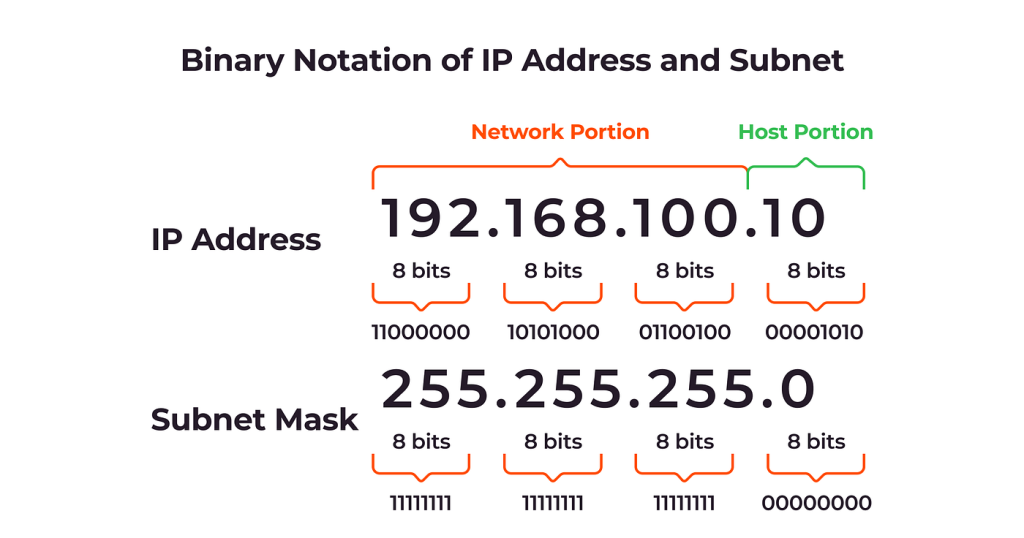
IP subnetting is considered to be a very critical and core part of any IP networking. Over these years, it has been found that a lot of people struggle a lot to understand and study as it’s never explained in a way that people can understand. Due to which the struggle a lot while dealing with IP subnetting in the field. Here we bring in for you A to Z aspects of IP subnetting explained in an easy way that anyone can understand it.
IP address and subnets
IP address or Internet Protocol is a communication protocol, which is used from the smallest private network of the huge global networks such as the internet. In short IP address is a unique identification address that is given to a device on an IP network. An IP address consists of a 32-bit number ranging from 0 to 4294967295. All these large blocks are divided into small blocks or octets in order to make it easier to handle.
Alongside learning how to organize network addresses, explore how to evaluate an online service before disclosing sensitive details.
A subnet is the smallest network within large networks which directly correlate with a LAN. These play a vital role in establishing a network of communication through which a network can directly communicate with other MAC addresses. Subnets are divided into two parts, the beginning part is the Network ID and the ending part is the Broadcast ID. A data is transferred through a Broadcast ID which sends it to the right address. Network ID helps to establish a connection between the networks
The subnet mask plays a very vital role in determining the size of any subnet. 255,254,252,248,240,224,192, and 128 are the special numbers which you will see over and over again in the IP networking. The first two classes with a host bit length from 0 to 16. Mostly private networks work in the 8- to 24- bit range.
The “mask” In Subnet Mask
The mask in the subnet just not determines the size of a subnet, but it also helps to point out the end points of a subnet if any IP address is given within that subnet. A subnet mask literally masks out the host bits and leaves only the Network ID. So that you can easily determine the end and the beginning of the subnet.…
How Does A TCP/IP Fire Up The Internet?
TCP/IP is a communication language of the internet which allows communication between two or more computers through various network packets. Now these packets are a compilation of small data packs which are transmitted to other users via the internet.
TCP plays a vital role in collecting a large amount of data, then compiling it into various packets and then sending it to the receiver. Where the packet transforms into a useful information.
IP protocol layer helps that packet of information to be sent and received at the location needed to be transferred. This task is basically carried out on the surface, but there’s also a whole lot of going on under the surface which helps to work out things on the surface.
Under the surface internet consists of fours abstract layers which are:
1. Link Layer which is a physical layer which interconnects the nodes and servers.
2. Internet Layer which connects the host to various other across networks.
3. Transport Layer performs all the host-host connections.
4. Application Layer ensures the communication between applications on a network.
In short all these four layers are embedded in the TC/IP to ensure that all the data packets are sent and received at the correct location.
The internet is all about communication and access to information, but as we all know that the internet is like a spider’s web which consists of a lot of connection points. So it’s very important that a right amount of information is accessed whether it’s requested from any location. For this TCP/IP is very much required as it plays a vital role in accessing the information right to your computers, no matter from where you access it.
Understanding how data travels across the internet provides useful context for checking who receives your personal information through an online service.
Now to work out the internet properly it’s pretty much important that information accessed reaches where is should reach. As we all know that there are many peers and points in the internet network so the information needs to take a lot of hops to reach to its destination.
Here TCP/IP is needed to make sure that the information reaches its ideal destination and no where else. So we can say that without TC/IP one cannot transfer packets of information to their desired location and make the internet workout as it is working today.…